

If you are holding a wireless microphone, should the antenna point toward the receiver? Usually, no.
A typical wireless microphone antenna does not behave like a flashlight shooting radio waves out of the tip. Linear antennas generally work much better from their sides than directly off the end.
So the goal is not to aim the bottom of a handheld microphone at the receiver rack.
For most presenters, the best thing to do is so much simpler. You just hold the microphone normally and let the wireless system do its job.
Where antenna direction really starts to matter is on the receiving side.
The tip of the antenna is not the strong part
This is the part that feels backward at first.
If you look at a straight antenna, it is natural to assume the radio signal travels in whatever direction the antenna is pointing.
That is not how a typical whip or rod antenna will behave.
Reception and transmission are strongest around the sides of the antenna and weaker off of the ends. That means taking a receiver antenna and pointing its tip directly toward the stage can actually put the transmitters near one of the antenna’s weakest spots.
This is one reason you’ll often see small receiver antennas standing vertically or angled outward rather than lying flat and pointing toward the presenter.
The exact setup depends on the type of antenna, but the important idea is easy to remember…
A straight antenna usually does not need to point at the microphone like an arrow.
So how should you hold a wireless handheld microphone?
The person speaking should concentrate on keeping the microphone a useful distance from their mouth, not on aiming an invisible radio beam across the ballroom.
Many modern handheld wireless microphones have their transmitting antenna built into the lower portion of the microphone body.
As the presenter moves, talks, turns, and changes the angle of the microphone, the antenna moves too. A properly designed receiving system accounts for all of that without you having to think about it.
What you do not want is someone deliberately covering or gripping an exposed antenna area because they think it will improve the signal.
The same principle applies to bodypack transmitters. If a pack has a flexible antenna, do not coil it into a pocket, wrap it tightly around the transmitter, or bury it against something that blocks the RF signal.
People are pretty good at getting in the way of radio waves all by themselves. There is no reason to make the antenna’s job harder.
Microphone choice matters too, especially when presenters, panels, and audience Q&A all need different things.
Line of sight matters more than perfect aim
The one antenna rule worth remembering for live events is give the receiving antennas a clear view of the transmitters whenever possible.
That does not mean you literally need to see the antenna on the microphone from across the room.
It means avoiding unnecessary obstacles between the stage and the receiving antennas.
Human bodies can absorb and block RF energy. So can walls, metal structures, equipment racks, scenic pieces, and other dense objects.
Imagine putting the wireless receivers inside a metal rack at front of house with both antennas hidden behind several pieces of equipment.
Technically, the antennas are attached, but, that does not mean they are in a good place.
For larger shows, remote antennas can be moved out of the rack and positioned somewhere with a much cleaner path to the stage.
Sometimes simply getting the antennas above audience height can make a huge difference.
Why are there two antennas on the receiver?
Those two antennas are not decoration.
Most professional wireless microphone receivers use some form of diversity reception.
A wireless signal does not take one perfect path from the microphone to the receiver. It reflects off walls, ceilings, people, metal, and other surfaces along the way.
Those reflected signals can arrive at slightly different times and interact with one another. At certain locations, that can create a weak spot.
If you just move a few inches, the signal may be perfectly healthy again.
Diversity gives the receiving system more than one opportunity to capture a usable signal.
That is why two receiver antennas should not simply be piled on top of one another.
Depending on the system, they may be spaced apart, angled differently, or incorporated into a specialized diversity antenna.
Should receiver antennas make a V?
You have probably seen wireless receivers with two small antennas angled outward into a wide V.
There is a reason for that.
Wireless handhelds and bodypacks do not remain perfectly vertical during an event. A presenter turns. Someone tilts the microphone. A bodypack antenna shifts as the person moves.
Radio waves from linear antennas have a property called polarization, which is related to the orientation of the antenna.
When the transmitting and receiving antennas are similarly oriented, reception is generally stronger. Turn one far enough away from the other’s orientation and signal strength can drop.
Angling two diversity receiver antennas differently gives the system more chances of having one antenna in a useful orientation as the transmitter moves.
Paddle antennas actually do get aimed
Now we get to the antennas that look like they should point somewhere.
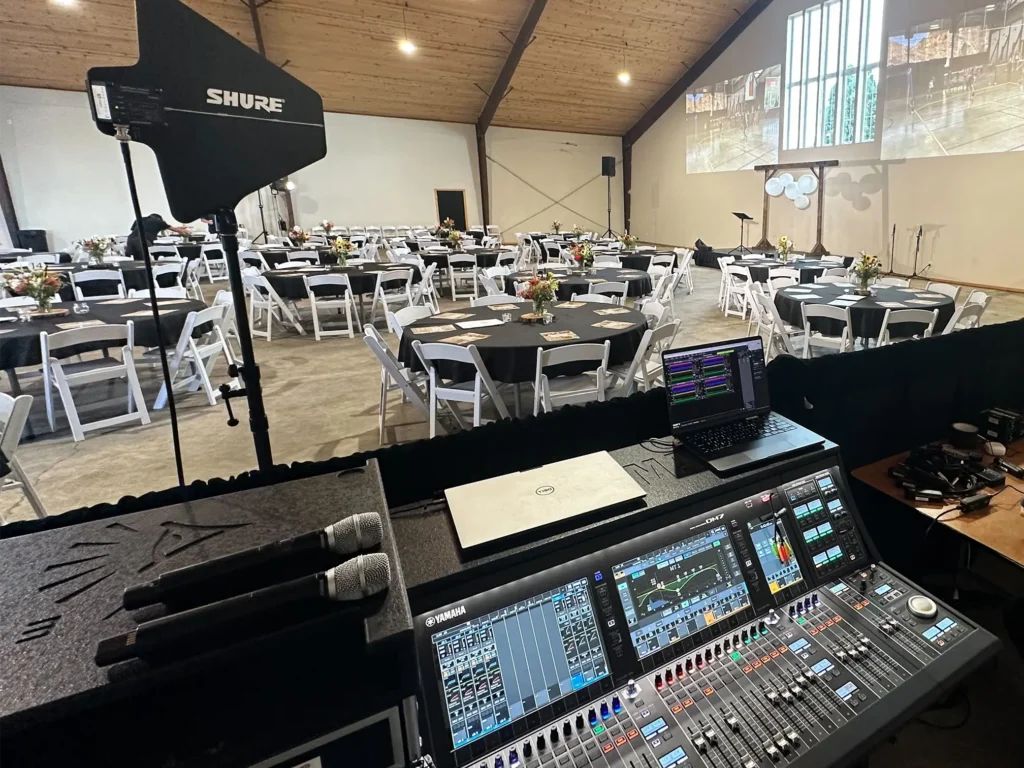
Directional antennas, commonly called paddle antennas, are designed to favor a particular coverage area.
These are often used on larger wireless microphone systems where the receivers are located away from the stage or where the production team wants better control over what area the antenna is listening to.
In that case, yes, direction matters.
The antenna should be oriented toward the area where the wireless microphones will actually be used.
That could mean a stage, a ballroom floor used for audience Q&A, or another defined performance area.
Manufacturer instructions matter here because different antenna designs behave differently. A traditional directional paddle and a circularly polarized antenna are not necessarily aimed or oriented in exactly the same way.
If the antenna has a front, use the front.
It sounds obvious until you have watched somebody point one edgewise at a stage.
Shure also publishes a detailed wireless antenna setup guide covering line of sight, antenna spacing, remote placement, and directional antennas.
Why do antennas sometimes sit at the side of the stage?
The wireless receivers do not have to live at front of house.
On larger events, MeyerPro will often place the wireless receivers backstage with the A2 and position the antennas nearby where they have a short, clean path to the stage.
That keeps the RF side of the system close to the microphones instead of trying to carry wireless signals all the way across a ballroom to front of house.
Once the receivers have captured the microphone signals, the audio can travel back to the FOH engineer over XLR or a digital snake. At that point, we are moving audio through a wired system instead of asking the wireless microphone system to cover unnecessary distance.
It also gives the A2 direct access to the wireless rack backstage, which is useful for checking transmitters, swapping batteries, troubleshooting a microphone, or making changes during the show.
The exact setup depends on the room, but the basic idea is simple.
We want to keep the wireless part of the signal path where it works best, then use the audio system to get the signal where it needs to go.
Antenna placement cannot fix bad frequencies
A perfectly positioned antenna can still receive interference perfectly.
Wireless microphone systems need both good antenna placement and great frequency coordination by your audio engineer.
When multiple wireless microphones, intercom systems, in-ear monitors, broadcast equipment, nearby television stations, and other RF devices share the same environment, the available spectrum has to be managed.
That is a separate problem from antenna direction.
If the frequency itself is competing with something else, rotating the paddle five degrees is probably not going to save the show.
Our guide to wireless mic frequency planning covers that side of the process in more detail.
Walk the room before the audience arrives
The best antenna position on paper is not always the best one in the building.
That is why a wireless microphone system should be tested through the areas where it will actually be used.
Walk the stage.
Go to the lectern.
Move through the onstage panel area.
If audience microphones will travel through the room, test the aisles too.
Watch the receiver’s RF performance and listen for weak spots or dropouts. If a problem appears consistently in one location, the crew can investigate while the room is still empty.
Moving an antenna a few feet is much easier at soundcheck than halfway through the CEO’s presentation.
So which way should the antenna point?
For a typical handheld wireless microphone, do not worry about aiming it at the receiver. Hold it normally and avoid unnecessarily covering the antenna area.
For small receiver whip antennas, follow the manufacturer’s orientation guidance. A vertical antenna or diversity pair arranged in a V is common.
For remote directional antennas, aim the antenna’s intended coverage pattern toward the area where the microphones will be used.
Beyond that, prioritize clear line of sight, sensible antenna spacing, distance from large metal objects and interference sources, and a proper RF test before the show.
Wireless microphone antenna direction matters.
It just matters a little differently than what most people expect.
Planning an event with wireless microphones?
MeyerPro supports corporate events with wireless microphones, RF coordination, audio systems, speaker support, video, screens, and live event production in Seattle, Portland, and beyond.